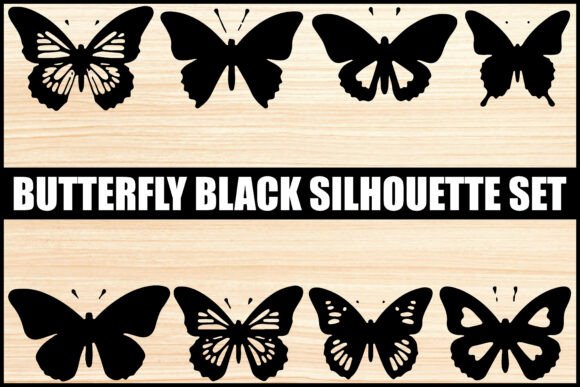
Mastering Your Designs with the Butterfly Black Vector Silhouette Set
There is a specific satisfaction in seeing a clean, crisp cut on vinyl or a sharp print on a t-shirt that only comes from using high-quality source files. Whether you are launching a small business selling custom apparel, creating wedding invitations, or simply decorating your home, the foundation of your project lies in the digital assets you choose. The Butterfly Black Vector Silhouette Set offers a versatile collection designed to meet these needs, but owning the files is only half the battle. Many creators stumble not because they lack talent, but because they overlook critical details in file selection and application. By understanding the nuances of vector graphics and avoiding common pitfalls, you can ensure your final products look professional every time.
Understanding the Value of True Vector Formats
One of the most frequent misunderstandings among beginners involves the difference between raster and vector images. When you download a bundle like this, which typically includes EPS, SVG, JPG, and PNG formats, it is tempting to grab the file that opens most easily on your computer. However, relying on JPG or PNG files for cutting machines or large-scale printing is a recipe for disappointment. These are raster formats, meaning they are made of pixels. If you enlarge them, they become blocky and lose definition.
In contrast, the SVG and EPS files included in a quality butterfly silhouette set are vectors. They use mathematical paths to define shapes, allowing you to scale a tiny icon up to the size of a billboard without losing a single bit of clarity. A common mistake is attempting to trace a low-resolution PNG within software like Silhouette Studio or Cricut Design Space to create a cut file. This often results in jagged edges and unnecessary anchor points that cause your cutting blade to stutter. Instead, always prioritize the native vector files provided in the bundle. This ensures smooth lines, efficient cutting times, and a polished finish on materials ranging from heat transfer vinyl to cardstock.
Avoiding the "One-Size-Fits-All" Trap in Design Application
Another area where creators often go wrong is assuming that every silhouette in a bundle works equally well for every project. A detailed butterfly outline with intricate wing patterns might look stunning on a digital screen or a large poster, but it can be a nightmare when cut into small adhesive vinyl. If the negative space between the wing details is too small, the weeding process becomes frustrating, and delicate parts may tear or fail to stick to the transfer tape.
Before committing to a design, consider the end use. For vinyl cutting projects like decals or stickers, opt for the bolder, simpler outlines found in the set. These "monoline" or minimalist styles weed easily and adhere securely. Conversely, if you are creating a laser cut wooden sign or a paper craft where structural integrity is less of an issue than visual flair, the more complex, decorative butterflies are excellent choices. Matching the complexity of the butterfly clipart to your medium saves time, reduces material waste, and prevents the frustration of ruined projects.
Checking Compatibility and Software Settings
Even with the correct file format, technical hiccups can occur if you do not verify software compatibility. While SVG is a universal standard, different versions of cutting software handle imported data differently. A frequent oversight is failing to check if the layers in your SVG file are grouped correctly. Some bundles come with elements pre-grouped for easy coloring, while others leave every path separate. If you send a file to your cutter without ungrouping or welding overlapping paths where necessary, you might end up with double cuts that damage your material or misaligned layers in multi-color designs.
Take a moment to inspect the file in your editor before hitting "make." Look for stray points or open paths that could confuse the machine. Additionally, ensure you are using the right version of the file for your specific workflow. For instance, older versions of some design software may struggle with newer SVG specifications, making the EPS 8 format a reliable backup for professional illustration programs like Adobe Illustrator. Verifying these details upfront prevents the headache of troubleshooting mid-project.
Maximizing Versatility Beyond Cutting Machines
It is easy to pigeonhole a butterfly design bundle as solely for Cricut or Silhouette users, but limiting your thinking restricts your creative potential. These black insect vectors are powerful tools for digital marketing, web design, and branding as well. A common missed opportunity is neglecting to use these silhouettes for logo design or social media graphics. A simple, symmetrical butterfly makes an elegant emblem for a garden center, a yoga studio, or a personal blog.
When using these files for digital purposes, pay attention to how the black silhouette interacts with your background. Unlike a photo, a vector shape has hard edges. Ensure there is sufficient contrast between your black butterfly and the background color to maintain readability. Furthermore, because these files are scalable, they are perfect for responsive web design, where icons need to look sharp on both mobile phones and desktop monitors. By viewing the bundle as a comprehensive toolkit rather than just cut files, you extract significantly more value from your purchase.
- Evaluate Complexity: Always match the intricacy of the wing pattern to the size of your final cut; smaller projects need simpler designs.
- Prioritize Vectors: Never upscale JPGs for cutting; stick to SVG or EPS for crisp, professional edges.
- Inspect Layers: Check for grouped elements or overlapping paths in your software to prevent double-cutting errors.
- Diversify Usage: Utilize the silhouettes for digital logos, printables, and laser engraving, not just vinyl decals.
- Test Materials: Run a small test cut on scrap material to determine the ideal pressure and speed settings for detailed wings.
Ultimately, the quality of your DIY crafts or professional deliverables depends on the preparation you do before the machine starts running. The Butterfly Black Vector Silhouette Set provides the raw material for beautiful work, but your knowledge of how to handle those files determines the outcome. By respecting the differences between file types, choosing the right design complexity for your medium, and double-checking your software setup, you avoid the common traps that trip up so many others. Approach your projects with this level of care, and you will find that your workflow becomes smoother, your materials last longer, and your final creations consistently impress.